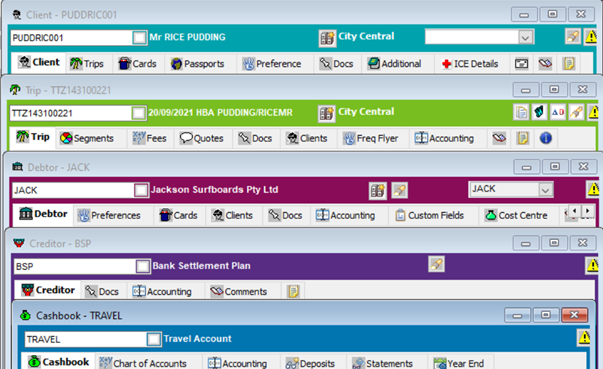
CrossCheck Travel Enterprise consists of a number of components which are used to store information and carry out account processing. The CrossCheck Travel Enterprise components are:
- MyCCT gives quick access to all system files
- Client Files store details of regular travellers
- Trip Files record each journey undertaken by one or more passengers. Trip Files are your main working area
- Debtor Files store information relating to your commercial clients
- Creditor Files store details of companies to whom you owe money
- Cashbook contains records of your General Ledger accounts
- Documentation
MyCCT
MyCCT gives quick access to all system files, through the use of hyperlinks in all modules. Additional reporting functionality has been included along with extensive search capabilities for Trip and Client files.
Client Files
These are used to store details of regular travellers. Each Client file accommodates the details of one traveller only and includes phone numbers, addresses, business details, credit card records, passport/visa details, and travel preferences.
The Upload facility is available to transfer Client file data into Travelport+ which will automatically create a Travelport+ Booking file. See Module 4: Client File.
Trip Files
These are used to record each journey undertaken by one or more passengers. The Trip file is your main working area. It is within these Trip files that passenger names and itinerary details are stored, and where the passenger accounting transactions are initiated.
The Download facility is available from the Travelport+ reservations system which will automatically create a Trip file and complete many fields with data from the Travelport+ Booking file. See Module 5: Trip File.
Debtor Files
These are used to store information relating to your commercial clients. Company names, spending limits, business travel preferences can all be stored on Debtor files. Within each individual Debtor file accounting transactions are recorded, i.e. issue of statements, receipt of payments. See Module 7: Debtor File.
Creditor Files
These store details of companies to whom you owe money. Details such as name, phone numbers, and address details can be stored. Travel related and non-travel related Creditors can be created.
See CCTE Finance User Guide for more details
Cashbook
This contains records of your General Ledger accounts. It is from the Cashbook that Bank Deposit Slips are created, Bank Statements are reconciled, and General Ledger transactions carried out.
See CCTE Finance User Guide for more details
Documentation
The Documents menu is context sensitive, meaning the contents on the menu change depending on the current file type open (i.e. Trip, Client, Debtor etc.), see Module 9: Documentation.
Module Colour Codes
The Modules within the system have been colour codes to facilitate easier navigation in CCTE.
The colours per each module are:
Client: Aqua
Trip: Green
Debtor: Burgundy
Creditor: Purple
Cashbook: Blue