
Several shortcuts are available within the CCTE application to allow for easy navigation.
New
Depending upon the cursor location, the New icon can be used to create additional lines for fields, such as Phones, Address, Credit Cards, Preferences etc., or entirely new files. This function also has a keyboard short-cut, Ctrl+N and can also be accessed from the File menu.
Save
On various windows and screens, the information must be saved before proceeding. Use the Save icon on the standard toolbar, the Ctrl+S keyboard short-cut, or the File menu.
File Drop-down Selection Lists
Some file windows have a drop-down selection list available from the top of the window.
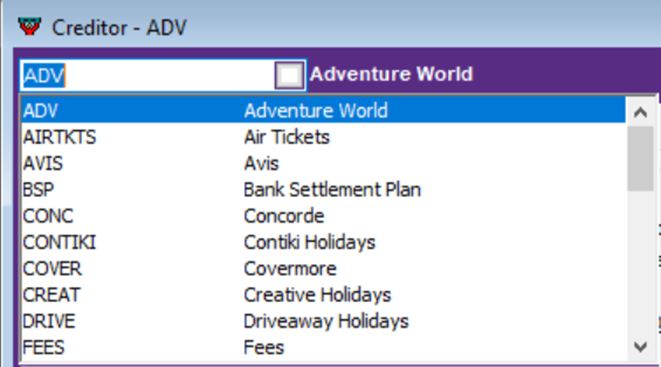
This list gives access to other files which can be opened by highlighting the required line.
Magnify Glass
Whenever the cursor changes to the CCTE Magnify Glass, double clicking on that item will open a related screen.
Mouse Right Click
In several areas a menu is available to from the Right mouse button. It will display a list of functions pertinent to the currently accessed screen.
Useful Keys
The following keys are useful short-cuts for functions that otherwise require menu selections.
| Key | Function |
|
F4 or Alt+I |
Open List Box |
| F5 |
Move to File Code field (drop down list at top of file widow) |
| F10 |
Same as ALT, displays keys to press in order to access menus |
| F11 |
Search – displays list of current file type, sorted by current field |
| F12 |
List – displays list of system table options for current field |
|
Ctrl+F4 |
Closes the currently open file |
| Ctrl+D |
Delete current file |
| Ctrl+F |
Opens Upload / Preference screen to perform upload of client file |
| Ctrl+H |
Open Travelport+ Host Application (Smartpoint) |
| Ctrl+N |
New record, line, field etc. |
| Ctrl+O |
Opens last accessed Trip, Client, Debtor, Creditor file (select from list of options) |
| Ctrl+Q |
Enter Query Mode |
| Ctrl+S |
Save current file |
| Ctrl+HOME |
Move cursor to first input field in current section |
| Ctrl+END |
Move cursor to the last input field in current section |
| Ctrl+TAB |
Move between open files |
| Ctrl+ENTER |
Select enter data entry line |
| TAB |
Move cursor forward to next input field |
| Shift+ENTER |
Select entire field |
| HOME |
Moves cursor to beginning of current field |
| END |
Moves cursor to end of current field |