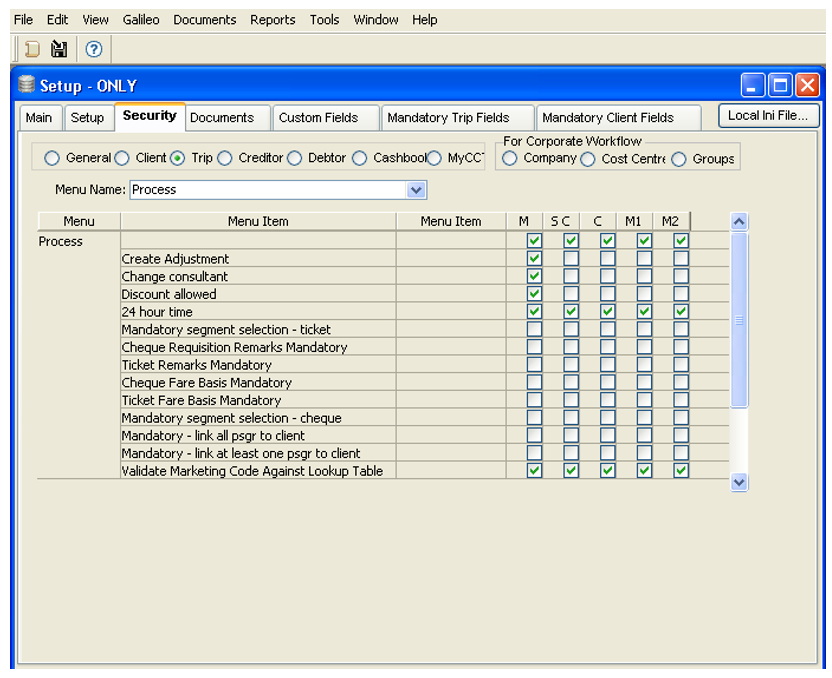
This Marketing Code appears on the Trip tab of a Trip file. It then defaults to the Quote screen and to each Cheque and Ticket Requisition created in this file.
It can also be entered or changed in the ticket and cheque requisitions.
It can also be selected as a mandatory item on the Trip tab.
Before the Marketing Code field on the Trip file can be used, there are two other entries that must be completed for this field to be actioned correctly, these are:
- The possible entries must be created in Tables.
- The Security area under the Supervisor log-in must be specified to match the requirements for this field.
Skip To:
Creating the Codes in Tables
To create these entries in Tables:
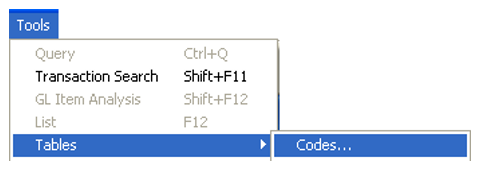
- From the Menu bar, select Options and then Tables. Select the Codes table from the sub menu.
- Select Marketing Code from the scroll attached to the Lookup Code field.
Any existing entries will then be displayed in the adjacent area.
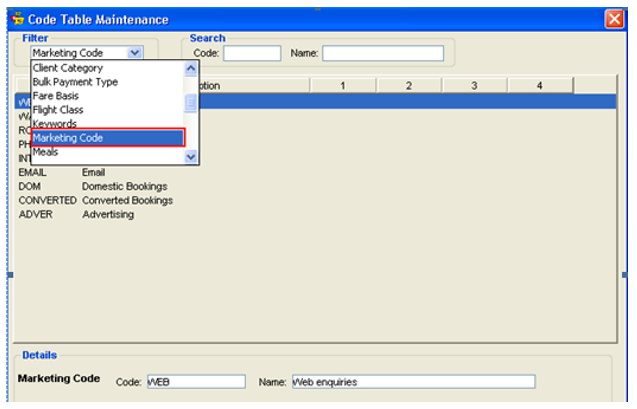
- Click on the New button to make a new entry.

- Click Save, and then the New button again if the user wishes to create another entry, or Exit to save the entry and exit the screen.
Supervisor Settings and Trip Marketing Code
The User must Log In as Supervisor to specify the way they wish to use the Marketing Code on the Trip file. To complete this procedure:
- Click on the Security tab
- Select the Trip module radio button
- Select Process from the Menu Name scroll
- Locate the Validate the Marketing Code Against the Lookup Table item
If this box is ticked for a user group, the marketing codes used must match the codes entered in the tables. If this box is not ticked, the user is able to make a free text entry in the Trip file marketing code fields.