
Skip To:
The Other ID field could be used as a marketing tool as it is a field which allows for the easy retrieval of a group of files not associated to a Debtor and not fitting the client category field.
The Other ID field can be completed on the Client tab, or under the Additional tab on the Client file as shown below.
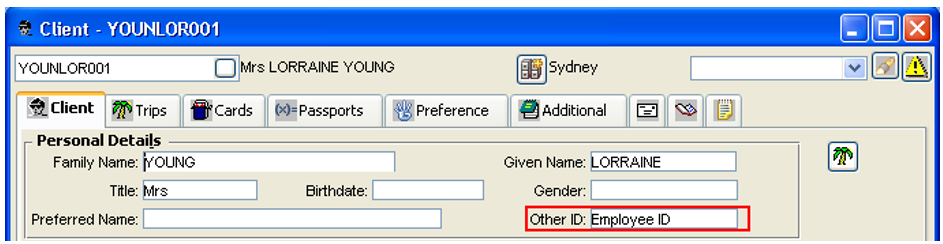
To complete the Other ID field:
- Open the Client file and complete the Other ID field on the Client tab or select the Additional tab.
- Click on the Interface tab on the left-hand side.
- Complete the Other ID field with a free text entry.
- Click on the Save icon on the toolbar.
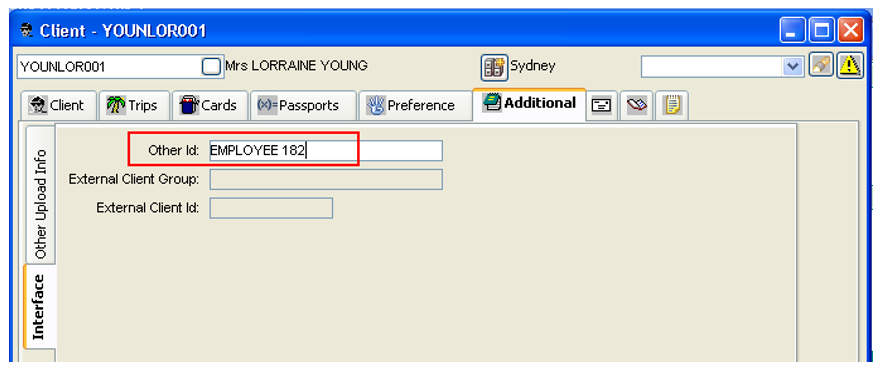
In this example the Defence Dept Debtor might want their clients to use their Employee numbers when making bookings as well as their Cost Centre code.
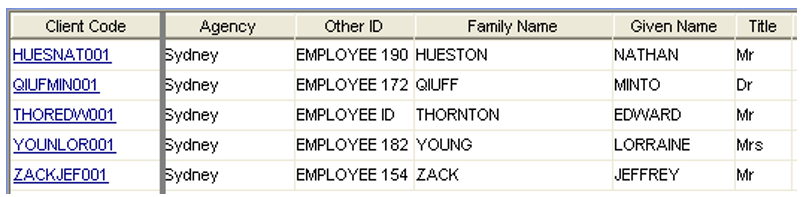
If the agent needs a list of employee numbers they could be retrieved in the Client Search screen using the Other ID field.
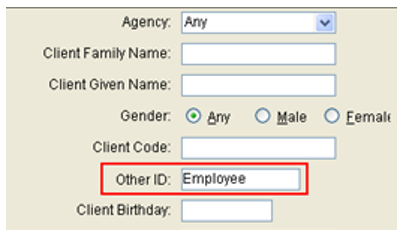
The screens below show a group of radiography researchers who all work for different organisations and do not belong to any common group, however CCTE allows me to retrieve their files as a group so that I can send out relevant conference package specials.
Switching Off Other ID
If your agency does not want the Other ID displayed on the Client tab of the Client file, the user can choose to switch it off by:
- Log on as Supervisor and click on the Security tab.
- Select the Client radio button.
- Select Other from the Menu Name scroll.
- Untick the Show Other Id on Front Screens option for any user group.

Examples of How to Use Other ID
The Automobile Associations travel agents could use the Marketing Code on the Trip tab of the Trip file to store the passenger's membership number. It would be useful to have this information on the cover so the consultant could easily see which files qualified for the extra discount. It could also be used in the Design Your Own Sales reports. The Other ID field on the Client file cover - for the same purpose, and it also makes it easy to retrieval these files using this field in the Client Search screen.
The Other ID field could be used to organise groups if an agency has large group markets. The files can be easily retrieved with Client Search, and the entry is attached to the Client permanent record - so a list could be produced for every group and the entry deleted after they depart. The Group Name field on the
Trip file could also be used while the booking was current, but for permanent records could be extracted from the Other Id field.