
Unconfirmed Tickets
If the PNR has been ticketed, on download CCTE automatically creates a new, unconfirmed Ticket Requisition.
Note: If changes are made to the booking resulting in the field fare being deleted or invalidated, an unconfirmed ticket requisition may not be created.
Similarly, a Filed Fare (FF) that is not ticketed does not generate to an unconfirmed Ticket Requisition. It is recommended that files are downloaded immediately after ticketing, otherwise manual ticket requisitions may need to be created.
The CCTE Download Complete screen displays details of any unconfirmed Ticket Requisition transaction created. This process creates an Unconfirmed ticket record, able to be viewed from the Accounting tab.
Unconfirmed Ticket Requisitions should be opened immediately after completing the download, to finalise required fields.
Downloaded tickets default to type TKT/CCF/TEX or TXC. The Type selected in the dropdown will look at the following fields to determine what the form of payment was for the ticket. The download reviews the F. field in the PNR in addition to checking the FOP in the TMU during the download /re-download of a ticketed PNR. If a ticket is manually created in CCTE, the ticket type is based on the default ticket in the current set up under Tools/Options in CCTE.
Adjust the Type field to properly reflect the transaction being saved, if required. Check all fields, making any adjustments.
The following areas may require further manual completion:
- Fees
- Fare Basis
- Discount
- Commissions (incl. override)
- Marketing Code
- Taxes
Commission percentage will download from TMU of filed fare and it will override any commission amount stored in the Supplier tables.
Note: Manual tickets will pick up commission from Supplier tables if set
Ticket Exchange downloads as TEX or TXC ticket types – Only additional collection downloads
Click OK to save the completed ticket requisition and answer Yes on the confirmation prompt. The status changes to C for confirmed on the Trip file’s Accounting tab.
Note: Where these functionalities have been set up, any ‘OB’ Ticketing Fees collected by carriers or Commissions on Taxes offered by carriers will be automatically included on applicable downloaded tickets.
For further information on setting up OB Ticketing Fees, please see CCTE Finance User Guide. See the Commissions on Taxes section of this module for further information on commissionable taxes in CCTE.
Note: Should any Unconfirmed Ticket Requisitions be present, unless Confirmed, these will prevent the End of Day report from running. It is therefore recommended that the Ticket Requisition be completed immediately after performing the download.
OB and YR tax
The OB fee can only be captured from the GDS PNR once the filed fare has been ticketed if ‘Download Filed fares to Trip Quotes’ is switched on in Branch. If the filed fare has not been ticketed there will be no OB fee to capture in the download/re-download. The download/re-download will capture the OB fee in the quote screen once the ticket has been issued against the filed fare.
When a new filed fare has been created, after the first download and the option ‘Download Filed fares to Trip Quotes’ is switched on in Branch. On re-download of the PNR a new quote will be created if a tick exists against the ‘Re-download Filed Fares box. If no tick exists then no new quote will be created. If a tick exists on the ‘Re-download Filed Fares’ screen then any new filed fares created after the first download showing an OB fee against the issued ticket then the quote screen will show the OB fee. The ticket requisition created on re-download will show the OB fee.
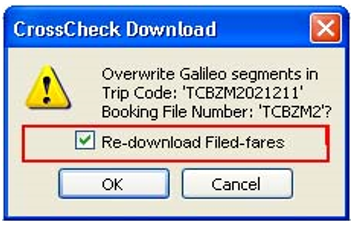
When ’Download of filed fares to trip quotes’ is switched on in Branch, the following will occur:
- If the trip file already has a quote and the filed fare has been ticketed. On Re-download the tick is selected to re-download filed fares. A new quote will be created for the same filed fare with the OB fee showing on the quote screen. Note: It will be up to the user to delete the quote they no longer require from the quote maintenance screen or via the quote screen.
- If the trip file already has a quote and the filed fare has been ticketed. On re-download if the tick is not selected to re-download filed fare. No new quote will be created and it will be up to the user to update the current quote with the OB fee amount.
- If The trip file does not have a quote and the filed fare has been ticketed. On re-download a quote is created including the OB Fee.
OB tax will only download on a quote where:
- The Fare Quote is ticketed.
- The Fare Quote is being downloaded for the first time.
- If a Re-download (of the Trip), the Fare Quote is new and the user opts to 'Re-download Fares'.
OB tax will NOT download if:
- The Fare Quote is not ticketed.
Quote screen, ticket has not been issued, No OB fee
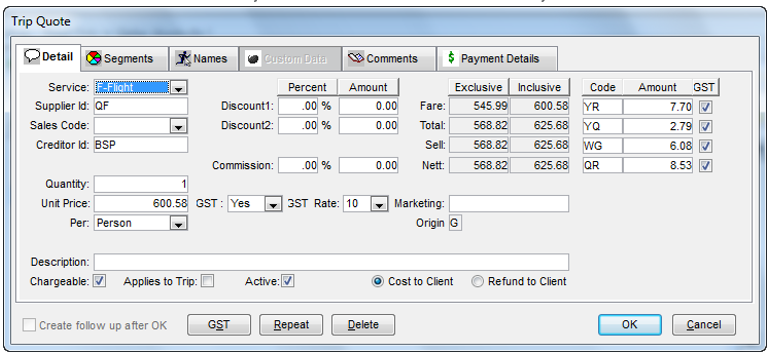
- Original Fare Quote is amended/re-downloaded.
- Ticket is not selected on re-download for ‘Re-download field fare’.
Quote after re-download, E-ticket issued, No OB Fee shows user to update manually
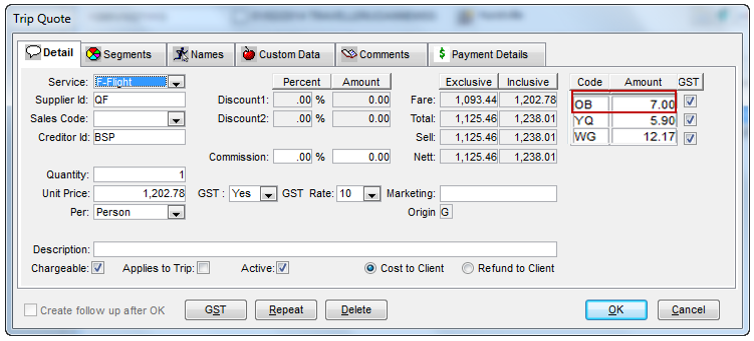
YR Tax - If a filed fare is manually built for an exchange the quote for the YR tax in CCTE may be incorrect and the user will need to update the quote screen manually.