
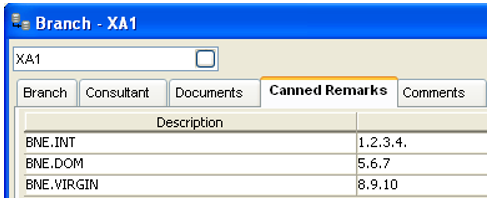
Each Agency has its own set of Canned Remarks. These remarks are determined, entered and stored in the Travelport+ host system.
Remarks can be reviewed in the Viewpoint Command screen (via window\Travelport+ command) by entering RPFD/RMKS.
Host remarks can be initiated during client profile uploads.
To add a remark group to CCTE:
- Click on the New icon or press CTRL+N
- Enter a description for the group of remarks, e.g. International BNE, Domestic SYD
- Enter the number of each remark (in order) to be included in the group. Separate each remark with a full stop
- Click on the Save icon on the toolbar or press Ctrl+ S to save the changes