
Additional reporting functionality has been included along with extensive search capabilities for Trip and Client files. Features such as My Files, Workflow Action Items and Important Notes are also accessed from the MyCCT menu.
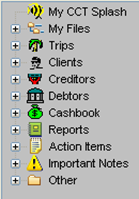
The majority of options available in MyCCT are accessed using the MyCCT Menu. Each option, except for MyCCT Splash, contains sub menus that are displayable by clicking the + icon next to the relevant heading. Once a menu has been expanded, clicking the - icon collapses it. Selecting any folder from a sub menu will display the results in the Work Area.
Other frequently used MyCCT functions are available from the MyCCT Toolbar. For a detailed description of the toolbar, see Toolbars.

Refreshing MyCCT
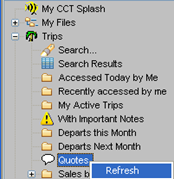
All MyCCT areas except Reports and Splash can be updated by right-clicking and selecting the Refresh function
Customising MyCCT
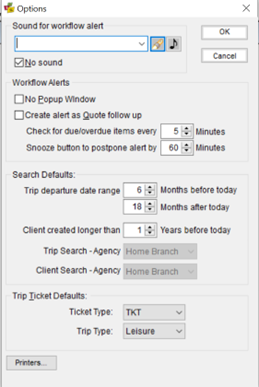
Customise some of the MyCCT default settings to suit your needs. Select the Tools heading on the menu bar, and then Options, to open a fill-in mask with the pre-set default setting displayed. This mask is not available when a file is open.
Note: It is suggested that Search default ranges are extended for longer periods than the default settings.
|
Function |
Description |
|
Sound for Workflow Alert |
Allows customisation of the Ring Tone used when an Alert Item becomes due. Select a new Ring Tone from the drop-down box or click the browse button to search and select a new ring tone. The Musical Note icon plays the current selection |
|
No Sound |
Turns off all sound for Alert Items |
|
No Popup Window |
Turns off all pop-up windows for Action Items. Action Items are then only accessible from the MyCCT Action Items sub menu |
|
Create Alert as Quote follow up |
Configures CCTE to automatically create a new Action Item when a quote is saved, ensuring all quotes are followed up |
|
Check for due / overdue items |
Sets the regularity of checking for new Due and Overdue Action Items. The smaller the number the quicker the Action Items will be displayed |
|
Snooze button to postpone alert |
Sets the number of default minutes an Action Item should be postponed when using the Snooze button within the Alarm Field |
|
Search Defaults |
Trip Departure Date range: Set the date range for the Trip Search function. Note: It is recommended that Search default ranges are extended for longer periods than the default settings. Client created longer than: Set the number of years before today for the Client Created search. |
|
Ticket Type |
Sets the default Ticket Type used when creating Manual Tickets -select from TKT or CCF |
|
Trip Type |
Sets the default trip type when creating new Trip files, select from Leisure, Group or Corporate |
|
Printers |
Printers can be tailored for each Transaction type. See CCTE Finance User Guide. |