
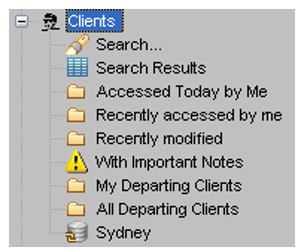
Client files can be retrieved using Pre-set folders or by completing a Search mask. Click on the + icon next to Clients to see the search folders.
Skip To:
Preset Search
The MyCCT Client section has many pre-determined search folders to retrieve files by commonly used groups. The following table describes the preset folders.
|
Preset |
Description |
|
Accessed Today by Me |
Client files worked on today by current consultant |
|
Recently Accessed by Me |
Client files recently worked on by current consultant |
|
Recently Modified |
Client files modified or created recently |
|
With Important Notes |
Client files with an Important Note attached |
|
My Departing Clients |
Client files owned by the current consultant, linked to a Trip file with a future departure date |
|
All Departing Clients |
All Client files linked to Trip files containing a future departure date |
|
All in Database |
All Client files in the CCTE application will be listed |
Clicking on a preset folder will display a list in the main Work Area. Each result has slightly different column headers and the data can be re-sorted by clicking on the required column heading.

Client Search
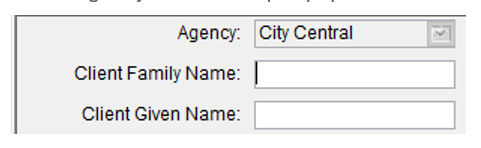
Click on the Search folder to open a fill in mask where you can complete as many fields as required to tailor your own search.
Click on the Search folder to open a fill in mask where you can complete as many fields as required to tailor your own search.
The Client Search also has an Agency field and acts in the same way as the Trip Search.
Note: Agency field will be pre-populated with the user’s Home branch.
Click on the Search Now button to display a list of files in the Work Area. Any file can then be opened by clicking the hyperlink on the Client Code.
It is possible to search for Trips and Clients based on a BPAY CRN via MyCCT search screens. An additional column has been added in the results.
To clear the fields and start a new search click the New Search button.
Search Results
Once a Search has been conducted, a list of Clients files will be displayed in the Work Area and the results stored in the Search Results folder, until the Search function is used again.