Skip To:
Net Remit Tickets
NRC - Net Remit Payment by Credit Card
Downloading of Net and Net Remit CCCF Tickets
CAT 35 Fares
NRR – Refund BSP Net Remit Payment by Credit Card
Net Remit Discrepancies
Net Remit Tickets
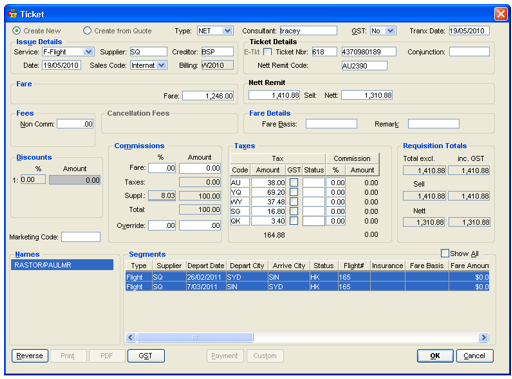
The Net Remit facility allows agents authorised by airlines to issue BSP tickets at Net fare levels to record details of the tickets in CCTE. The Tickets entered must be completed using the Net Ticket requisition type and include the relevant Net Remit Code provided by the airline.
When a ticket is downloaded from Smartpoint the ticket type is always TKT. When you open the Ticket requisition you will need to change the ticket type to NET before proceeding when a Net remit ticket is required.
Net Remit tickets may be entered in CCTE with either:
- Option 1- showing the Trip value as Gross (Published or Ticket) fare with a discount to reflect the selling fare
- Option 2 - showing the Trip value as the selling fare with zero discount. This method ensures that no unusually large discount amounts appear in the consultants reports
Option 1: Trip Value as Gross Fare
Take the following steps to complete the Ticket Requisition screen for this scenario:
- Select NET from the Type drop-down. If the transaction is being paid by Credit Card direct to the supplier, use type of CCF instead of NET.
- Select Yes, No or Comm in the GST field.
- Enter the Ticket number and ticket details.
- Enter the Net Remit Code.
- Enter the Fare as the full published fare shown on the ticket including GST (if applicable). This amount should exclude non comm fees and taxes.
- Enter the required details for the Net Remit section:
- Sell: the selling price of the ticket, including GST (if applicable) and all taxes
- Net: the Net price of the ticket including GST (if applicable) and all taxes
- The system automatically generates the Discount field, displaying the difference between the Sell and Net fields.
- Enter the normal Fare Commission as a percentage. The system calculates the Supplementary commission (the difference between the Fare and Net fields less any normal commission amount). A total of all commissions is provided at the bottom of the section
- Enter any applicable Taxes and a Marketing Code if required. The Requisition Tools section is system generated, detailing the totals as entered in other fields
- Select the Passenger Name from the Names section. If not working from a Quote, select the appropriate segments
- Save the Ticket Requisition by clicking OK and answering Yes to the confirmation prompt
- This transaction will be reflected under the accounting tab as shown below:
Option 2: Trip Value as Selling Fare
Complete the ticket requisition as described below except for the Fare field where you should enter the selling fare rather than the full published fare.
The Trip value now reflects your sell price.
NRC - Net Remit Payment by Credit Card
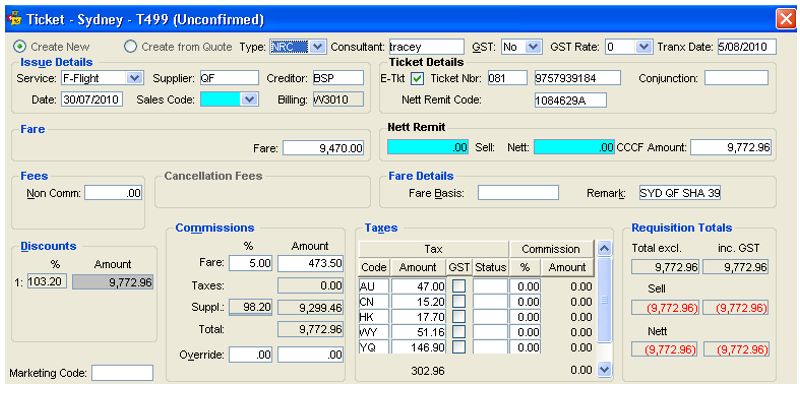
For tickets issued on behalf of airlines that permit Net Remit Tickets to be paid by the Passengers Credit Card and reported to BSP.

The Net Remit area of the ticket permits the inclusion of the Net Remit Code, Sell, Net and CCCF Amount.
Downloading of Net and Net Remit CCCF Tickets
- When downloading net remit ticket the AI field must exist in TMU with non- null value. When the AI field is present then the ticket type will be set to a Net Ticket Type being (either NET or NRC – see below). If there is no AI field in TMU or if AI field without value then download as TKT type.
Note: Download as TKT type will be as per current TKT download logic.
Exclude download of Commission when downloading as TKT as commission download is not currently supported.
- FORM OF PAYMENT
When FOP in TMU = Cash, Inv, Cheque then Type is set to NET
When FOP in TMU = Credit Card ten Type is set to NRC
NRC Ticket will download as below, and all Mandatory fields will need completion as per Option 1 or 2 above, as required
Note: Net Remit tickets cannot be reissue.
CAT 35 Fares
A fare type for Private Fare called Cat35 has been introduced by some Airlines which better handles the requirements of negotiated fares, such as multiple, related fare amounts, ticketing fare mark ups, and enhanced security (Sales Restrictions).
The download process identifies when a CAT35 Fare is present. This is determined by the presence of Net Ticket Data. The ticket type will be identified by the FOP (Form of Payment) in the TMU (Ticket modifier update) of the filed fare.
On download of flight segment the CAR CODE/TOUR CODE/VALUE CODE is captured and populated in the Tour Code field on the Flight Segment – Transit/Meals/SSR.
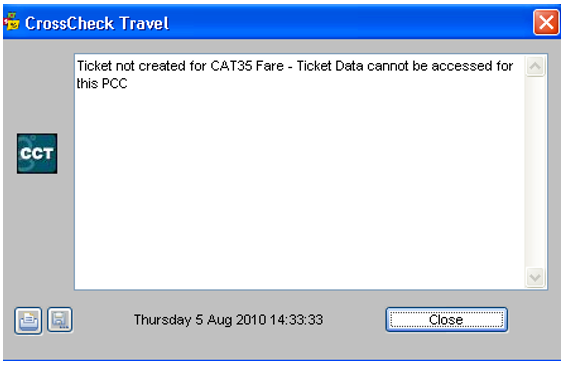
If Net Ticket data cannot be accessed then the following download error will be shown. The download process should continue for other ticket processing.
All other behaviour for download of the Flight Segment remains as per the current process.
NRR – Refund BSP Net Remit Payment by Credit Card
This is the Refund type that should be use when a NRC - Net Remit Payment by Credit Card is being refunded to the passenger.
Net Remit Discrepancies
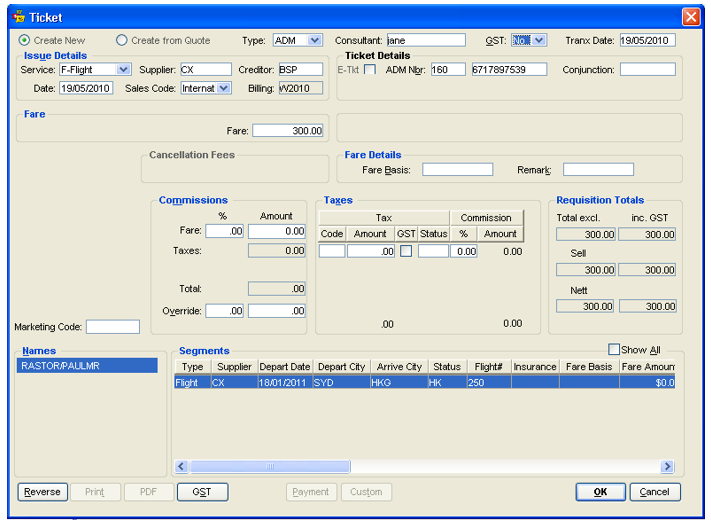
When an error has occurred and BSP charge your agency a higher fare, take the following procedures:
- Create a new ticket requisition (Ctrl+N) and select ADM from the Type drop-down
- In the Fare box, enter the difference of what the Net amount should have been and what your agency has been charged on the billing
- This will put the Trip file in Debit and act as a reminder to chase the ACM from the airline
Credit Card
To enter Net Remit Credit card transaction in CCTE:
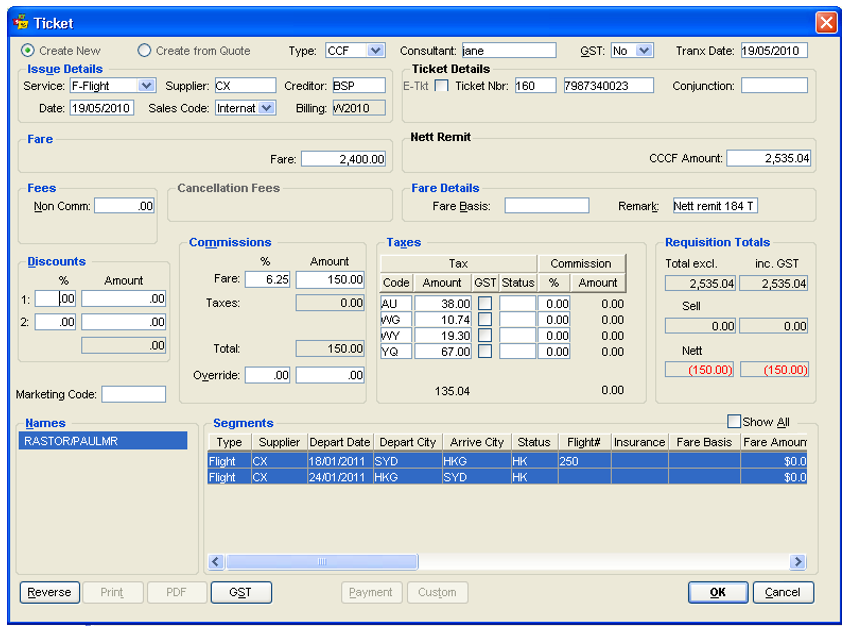
- Open a Ticket requisition (Ctrl+N) and select CCF from the Type dropdown.
- Enter the Sell amount in the Fare field.
- In the CCCF field enter the Sell amount including taxes.
- Calculate and enter the Commission amount. This will be the difference between your Sell and Net amounts.
- Enter the Taxes.
- The Requisition Totals in the Sell field will show zero.