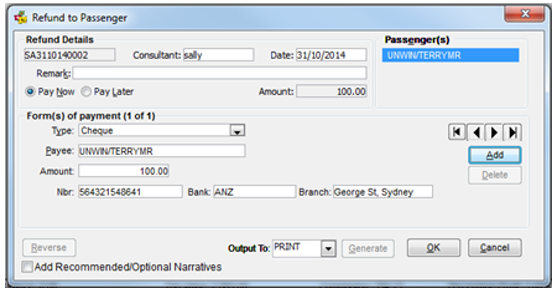
When a discount has been given and payment is made by credit card, two methods can be used to record this accurately in CCTE, ensuring the trip file is in balance and accurate reports are produced.
Method 1
The physical BSP ticket is issued with the Credit field of the Remittance Area containing the amount being charged to the passenger and the Cash box containing the discounted amount.
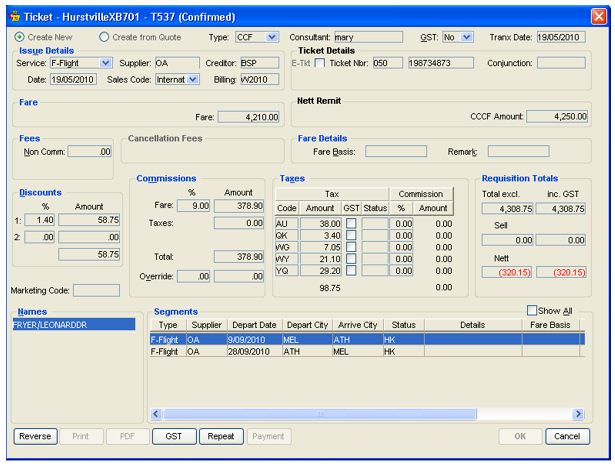
- Open a Ticket Requisition transaction and select Create New or Create from Quote.
- Select CCF in the Type field. Set the correct GST setting.
- Complete the fields in the Issue Details section and enter the Ticket Number.
- The Fare should be inclusive of applicable GST but must exclude any non-commissionable fees or taxes. Enter the amount charged to the credit card in the CCCF Amount field.
- Discounts to be applied can be entered in the Discounts area as either a percentage or fixed value amount. Complete the Commissions and Taxes sections as required.
- The Requisition Tools area details the system generated totals and reflects the following values:
- Total: Total fare including taxes
- Sell: When the discount equals the difference between the total and the CCCF amount this box equals zero
- Net: Total fare less the commission and the CCCF amount
- To save the transaction, click OK and answer Yes to the confirmation prompt.
Method 2
An alternative method is to make all entries as described in Method 1, except enter the full total into the CCCF amount field.
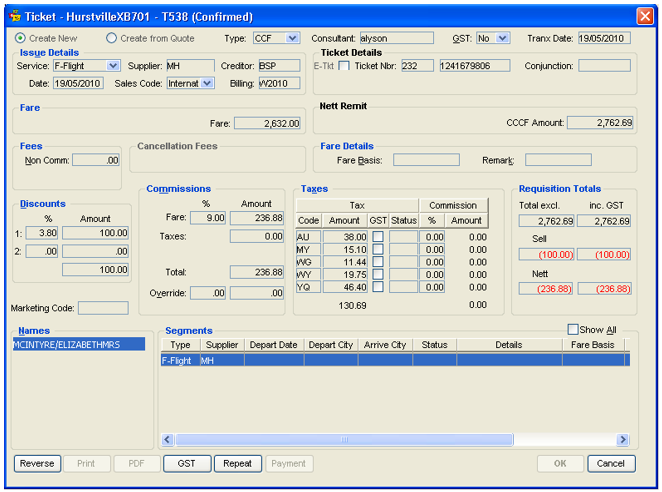
This leaves the discount amount in the Sell field, which becomes the amount credited to the Trip file and the refund to be paid to the passenger.