
Skip To:
Processing Pensioner Rail Tickets
Issuing Fee
Processing Phone Card Sales
Recording Fees
eNett
Processing Pensioner Rail Tickets
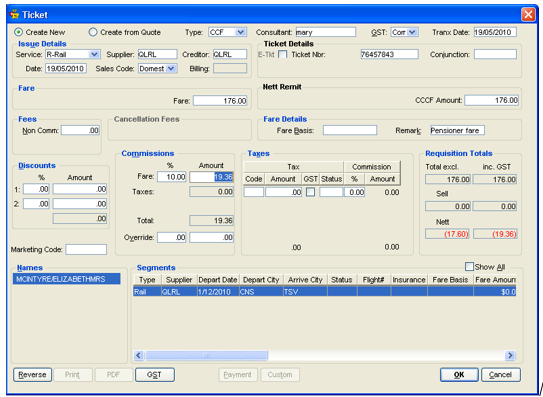
A pensioner rail ticket needs to be recorded on two ticket requisitions because GST only applies to the commission on the ticket but any fee charged for issuing the ticket will attract GST.
To enter the rail fare:
- Open a Ticket Requisition and select CCF in the Type field.
- Select from Create New or Create from Quote.
- Select the rail operator in the Supplier and Creditor fields.
- Select Comm in the GST field.
- Complete the Ticket Nbr field.
- Enter the ticket value in the Fare and CCCF amount fields.
- Complete the Commission field and any other fields required, and click on OK.
Issuing Fee
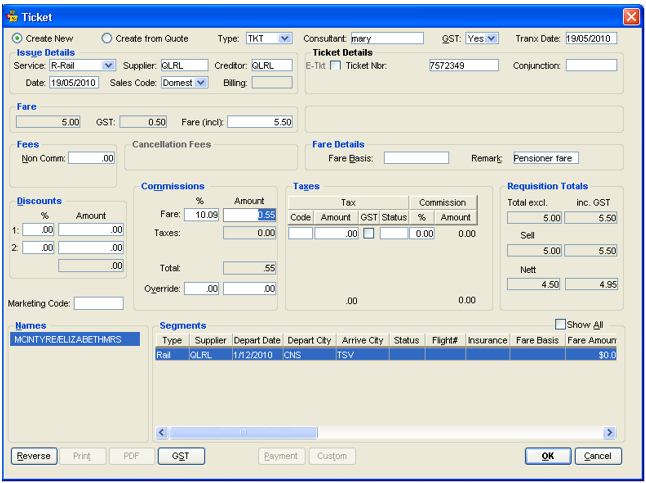
To record the issuing fee:
- Open a Ticket Requisition and select TKT in the Type field
- Select from Create New or Create from Quote
- Select the Rail operator in the Supplier and Creditor fields
- Select Yes in the GST field
- Enter the same ticket number as recorded in the previous ticket requisition in the Ticket Nbr field
- Enter the issuing fee (inclusive of GST) in the Fare field. (e.g. $5 for one way and $11 for return), could also include any additional collections for sleepers etc
- Complete the Commission field and any other fields required, and click on OK
Processing Phone Card Sales
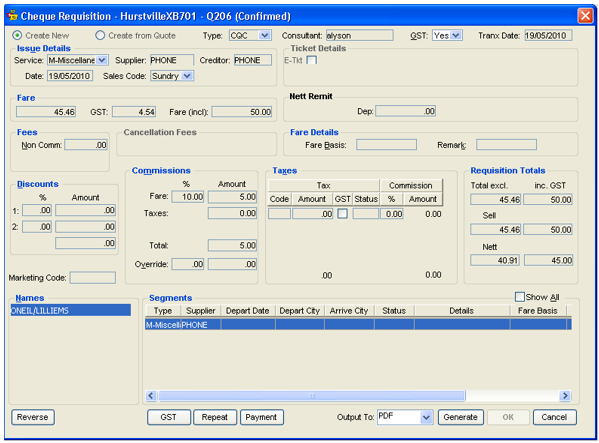
In the Trip file, receipt the passenger's payment in the normal manner and complete a Cheque Requisition as follows:
- Select CQC in the Type field.
- Select from Create New or Create from Quote.
- Select the phone card Supplier and Creditor.
- Select Yes, No or Comm in the GST field.
- Enter the cost of the phone card (inclusive of GST) in the Fare field.
- Complete the Commission field and any other fields required, and click on OK.
Recording Fees
To record Fees in CCTE, see "Fees Tab" in Module 5: Trip File.
eNett
Note: For Australian Agents Only
eNett acts as the payment gateway between the agency and the relevant credit card company (MasterCard, Amex etc.). eNett advises the credit card company of the transaction, who in turn charge the credit card. The funds are then sent via eNett to the agency bank account overnight (excluding the Merchant Services Fee).
eNett then email the Receivables file to the agent to import into CCTE. A debtor receipt is automatically created and allocated against the invoice created by the original download from Travelport+ to CCTE.